

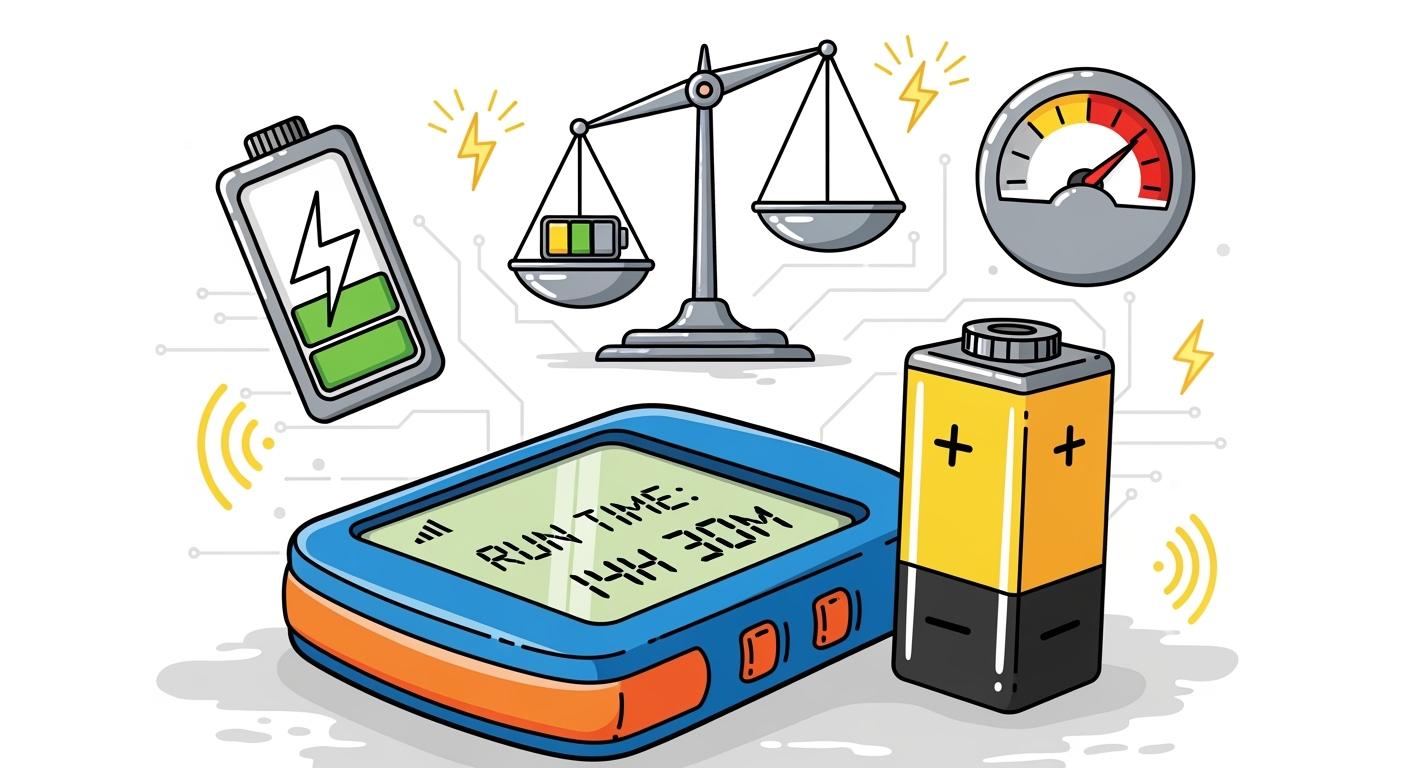
You can extend runtime in portable detection devices by balancing battery capacity with power consumption. Battery capacity measures how much energy a lithium battery pack can store. Power consumption tells you how much energy your device uses every hour. If your device uses less power, it runs longer on the same battery. For example, different appliances draw varying watts of power, as shown below:
Appliance | Average Power Consumption (Watts) |
|---|---|
LED Light Bulb | 10W |
Laptop Charger | 65W |
Refrigerator | 150-200W |
Television (50″ LED) | 100W |
Microwave Oven | 1,000W |
Central Air Conditioner | 3,500W |
You need to consider both battery size and device load to extend runtime. Advanced strategies, like adaptive power modes and event-based analysis, help you optimize energy use.
Key Takeaways
Balance battery capacity and power consumption to maximize runtime in detection devices.
Select energy-efficient components, like OLED or E-Ink displays, to reduce power usage.
Implement adaptive power modes to optimize energy consumption based on device activity.
Use duty cycling to limit active periods, significantly extending battery life.
Regularly monitor battery health and update firmware to enhance power-saving features.
Part 1: Battery Capacity vs Power Consumption
1.1 Lithium Battery Capacity Basics
You need to understand battery capacity to make informed decisions for portable detection devices. Battery capacity tells you how much energy a lithium battery pack can store. Manufacturers use several steps to specify and test this value:
Perform a visual inspection to check for damage or deformities.
Measure voltage with a multimeter to confirm expected levels.
Conduct a load test by applying a constant load and observing discharge.
Complete a full discharge cycle to measure the actual energy storage.
You will see battery capacity listed in watt-hours (Wh) or ampere-hours (Ah). Higher numbers mean more energy available for your device. In medical, robotics, and security system applications, you must select the right capacity to meet operational needs.
1.2 Power Consumption Explained
Power consumption shows how much energy your device uses during operation. Each component in your detection device contributes to total power draw. The table below highlights the main contributors:
Contributor Type | Power Consumption Impact |
|---|---|
LCD Panels with LED Backlighting | 60-80% of total system power, scaling with size and brightness |
High-Brightness Monitors | Can double power consumption compared to standard displays |
Screen Resolution | 20-40% more power for 4K displays compared to Full HD |
IPS Panels | Typically consume more power than TN alternatives |
OLED Technology | Can reduce power for dark content but limited peak brightness |
Capacitive Touchscreens | Generally consume less power than resistive types |
Multi-Touch Features | Increase processing requirements and power consumption |
You must analyze each component to find ways to reduce power use and extend runtime.
1.3 Runtime Calculation and Sizing
You can estimate how long your device will run by using simple formulas. Start by calculating the required battery capacity:
Required Capacity (kWh) = (Daily Energy Use in kWh × Days of Autonomy) / (Depth of Discharge × System Efficiency)
To size your battery and estimate runtime, follow these steps:
Determine the current draw for your device, using average or maximum values.
Size the battery based on the highest expected current for a conservative estimate.
If your device uses a voltage converter, calculate power in watt-hours.
Use this formula:
Runtime (hours) ≈ Battery Wh × Inverter Efficiency ÷ Load W
Limiting the charge range of lithium-ion batteries can increase their life, but it may reduce the energy delivered. High temperatures can shorten battery life. You must balance these factors to extend runtime and ensure reliable operation in industrial and infrastructure applications.
Part 2: Factors Impacting Runtime
2.1 Device Load and Components
You must consider every component in your portable detection device when you want to extend runtime. Each part, from sensors to displays, draws power from the lithium battery pack. For example, in medical monitors, robotics controllers, and security system terminals, the choice of display technology can make a significant difference. The table below compares common display types and their energy efficiency:
Component Type | Description | Energy Efficiency |
|---|---|---|
OLED Displays | Each pixel emits its own light, allowing precise brightness control. | More energy-efficient than LCDs |
E-Ink Displays | Use power only when changing content; ideal for static images. | Very low power consumption |
MicroLED Displays | Use inorganic materials; offer high brightness and long life. | High energy efficiency potential |
Selecting energy-efficient components, such as E-Ink displays for infrastructure monitoring or Bluetooth Low Energy (BLE) modules for industrial sensors, can greatly reduce power consumption. You should also match the battery size and form factor to the device’s operational needs, balancing runtime with usability.
2.2 Operating Modes and Environment
The way you operate your device and the environment where you deploy it both affect battery performance. For example, a robotics sensor that runs continuously will drain the battery faster than one that operates in short bursts. Environmental factors also play a major role:
Low temperatures increase charging time and reduce performance.
High temperatures speed up battery degradation.
Lithium-ion batteries can lose 10–20% capacity near freezing.
Performance drops by about 50% for every 18°F (10°C) below 77°F.
The ideal temperature range for lithium battery packs is 20°C to 30°C.
If you deploy detection devices in outdoor infrastructure or industrial settings, you must plan for these temperature effects to maintain reliable operation.
2.3 Adaptive Power Modes
Advanced power management strategies help you extend runtime without sacrificing performance. New frameworks, such as SmartAPM, use deep reinforcement learning to adjust power use based on device state and user behavior. In industrial and security system applications, adaptive power-saving mode control can optimize energy use by responding to network conditions and device activity. The table below highlights recent advancements:
Advancement | Description |
|---|---|
SmartAPM Framework | Uses deep reinforcement learning to optimize power dynamically in wearable and portable devices. |
Adaptive Power-Saving Mode Control | Adjusts power-saving modes based on network and device state, improving efficiency in NB-IoT. |
Soft Actor-Critic Algorithms | Enhances power management over traditional methods, especially in industrial IoT networks. |
By integrating these adaptive modes, you can maximize battery life in demanding environments and ensure your lithium battery-powered detection devices deliver consistent results.
Part 3: Extend Runtime Strategies
3.1 Higher-Capacity Lithium Batteries
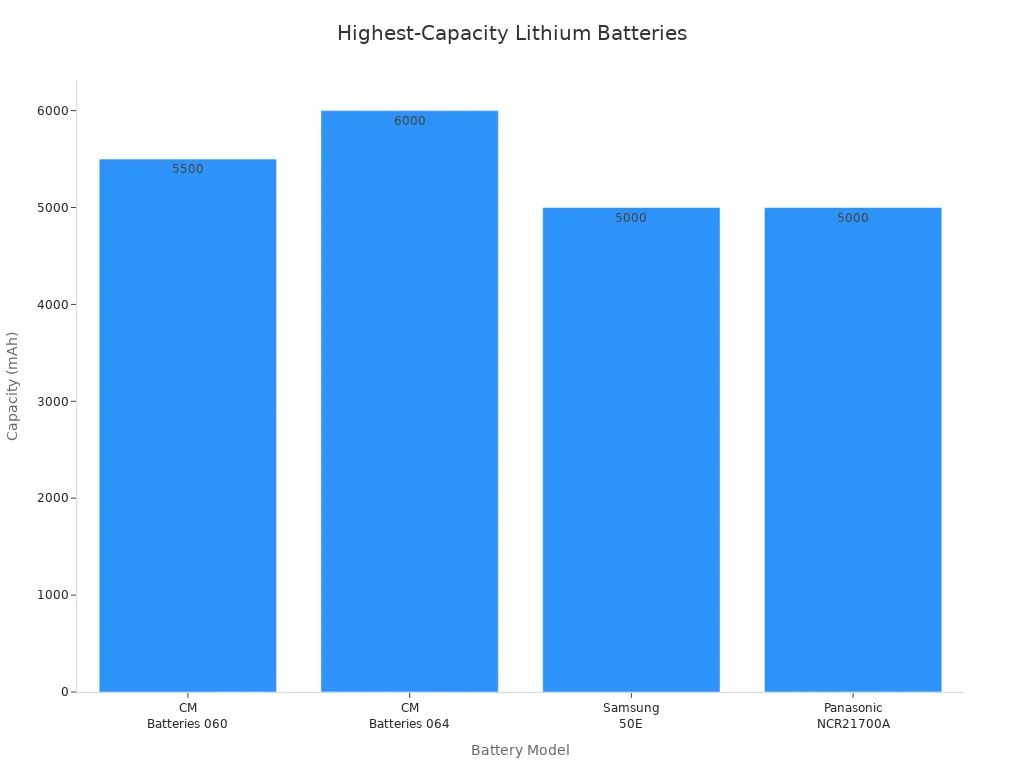
You can increase device runtime by selecting higher-capacity lithium battery packs. In medical monitors, robotics controllers, and security system terminals, battery selection impacts both operational time and device design. The table below compares some of the highest-capacity lithium batteries available for portable detection devices:
Battery Model | Capacity (mAh) |
|---|---|
CM Batteries 060 | 5500 |
CM Batteries 064 | 6000 |
Samsung 50E | 5000 |
Panasonic NCR21700A | 5000 |
When you choose a higher-capacity battery, you must also consider the impact on device weight and size. For example:
Larger batteries can make devices bulkier, which may not suit handheld or wearable applications.
You need to balance battery size with usability, especially in medical and industrial wearables where comfort and portability matter.
The choice of battery chemistry and form factor affects both energy storage and device compactness.
For advanced applications, you should always integrate a battery management system (BMS) to monitor cell health, prevent overcharging, and maximize battery life.
3.2 Hardware and Power Management
You can reduce power consumption and extend runtime by optimizing hardware design. Start by selecting only essential features and components for your detection device. The table below highlights effective hardware techniques:
Technique | Description |
|---|---|
Feature and Component Selection | Target only essential features to maximize battery life and avoid energy waste on unused components. |
Hardware Management | Implement power-saving techniques to reduce power consumption when hardware is not in use. |
Power-Efficient Displays | Choose displays that meet power and size requirements, avoiding LCDs for extended runtime needs. |
You can also use advanced circuit design methods:
Clock gating reduces power by disabling inactive circuits.
Multi voltage domains allow different parts of the device to operate at lower voltages.
Power gating disconnects unused sections of the circuit.
Register retention preserves data with minimal energy use.
Integrated power management circuits play a key role in lithium battery-powered devices. The table below shows how these circuits contribute to runtime extension:
Functionality | Description |
|---|---|
Real-time MCU-based control | Enables seamless battery switching and embedded load adaptation, enhancing energy efficiency. |
Intelligent power management algorithms | Monitors grid status and regulates load behavior to optimize energy usage. |
Dual-source power path structure | Ensures continuous voltage supply during grid perturbations, contributing to device reliability. |
Adaptive Load Management | Regulates display parameters to maximize battery life during power outages. |
You should always match hardware strategies to your application. For example, in industrial sensors, power-efficient displays and adaptive load management can significantly improve operational uptime.
3.3 Software Optimization and Duty Cycling
Software optimization offers powerful ways to extend runtime in lithium battery-powered detection devices. You can use several strategies:
Battery profiling and emulation software creates precise profiles that match device current consumption, improving battery life and safety in critical applications.
Firmware optimization reduces clock cycles and power consumption through efficient coding.
Memory management, such as caching data and minimizing external memory access, saves power.
ARM big.LITTLE technology combines high-performance and high-efficiency cores to balance speed and battery life.
Duty cycling is another effective method. By controlling how often your device operates, you can dramatically reduce energy use. The table below shows how different duty cycles affect energy consumption and runtime in real-world deployments:
Duty Cycle (%) | EeSN Energy Consumption (Wh) | StSN Energy Consumption (Wh) | Energy Reduction (%) | EeSN Runtime (h) | StSN Runtime (h) | Runtime Improvement (%) |
|---|---|---|---|---|---|---|
8.33 | 0.2155 | 1.0387 | 79.25 | 168.37 | 34.94 | 381.96 |
16.67 | 0.317 | 1.0654 | 70.24 | 114.46 | 34.06 | 236.04 |
25 | 0.4186 | 1.0921 | 61.67 | 86.69 | 33.23 | 160.91 |
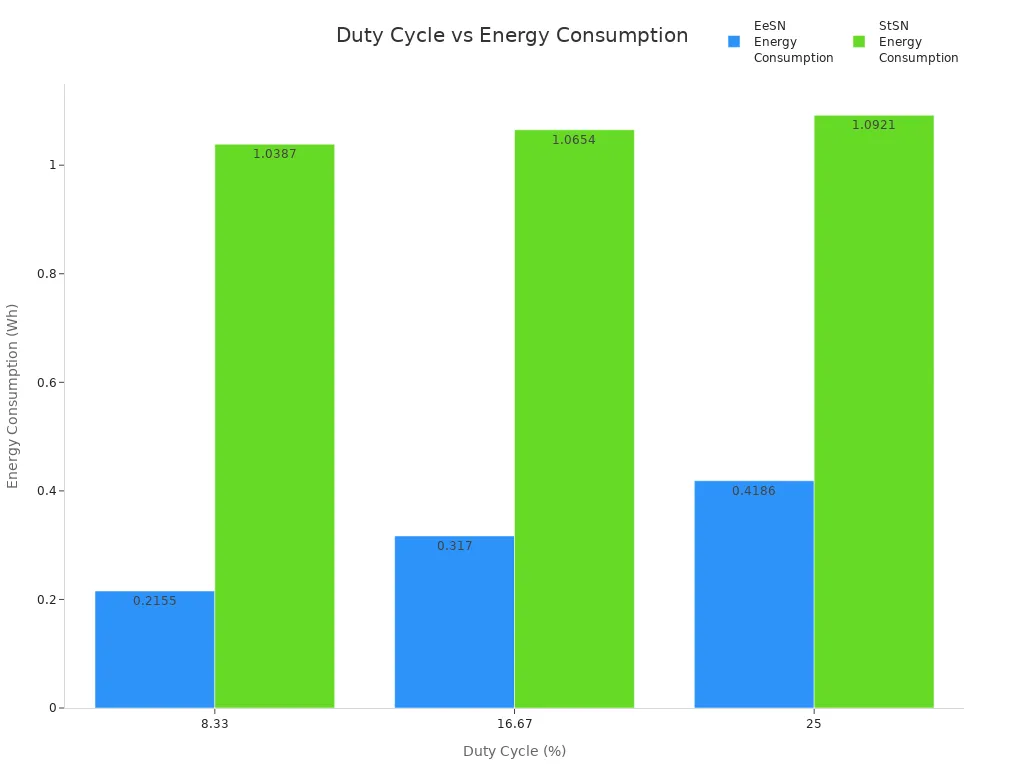
You can see that lower duty cycles lead to significant energy savings and longer runtime. This approach works well in infrastructure monitoring and industrial IoT, where devices do not need to operate continuously.
3.4 Practical Tips for Battery Life
You can apply several practical tips to maximize battery life in your portable detection devices:
Use power-supply components that are small and highly efficient to reduce energy waste.
Minimize heat dissipation to enhance battery longevity.
Optimize device and app settings to lower battery consumption.
Educate users on battery management techniques, such as checking battery health and identifying power-hungry apps.
Provide portable chargers or charging stations during scheduled breaks to keep devices powered throughout the workday.
Tip: Regularly monitor battery health and update firmware to ensure your device uses the latest power-saving features.
Event-based analysis and iterative optimization can further improve runtime. By analyzing device events and adjusting system parameters in real time, you can reduce unnecessary energy use. For example, adaptive computational granularity allocates higher fidelity computations only when necessary, preserving accuracy while saving power. Iterative optimization can reduce floating-point operations by up to 42% and achieve energy savings of up to 87% in edge-deployed systems.
You should always review device performance data and refine your strategies. This ongoing process helps you extend runtime and maintain reliable operation in demanding environments.
Part 4: Battery Drain Analysis
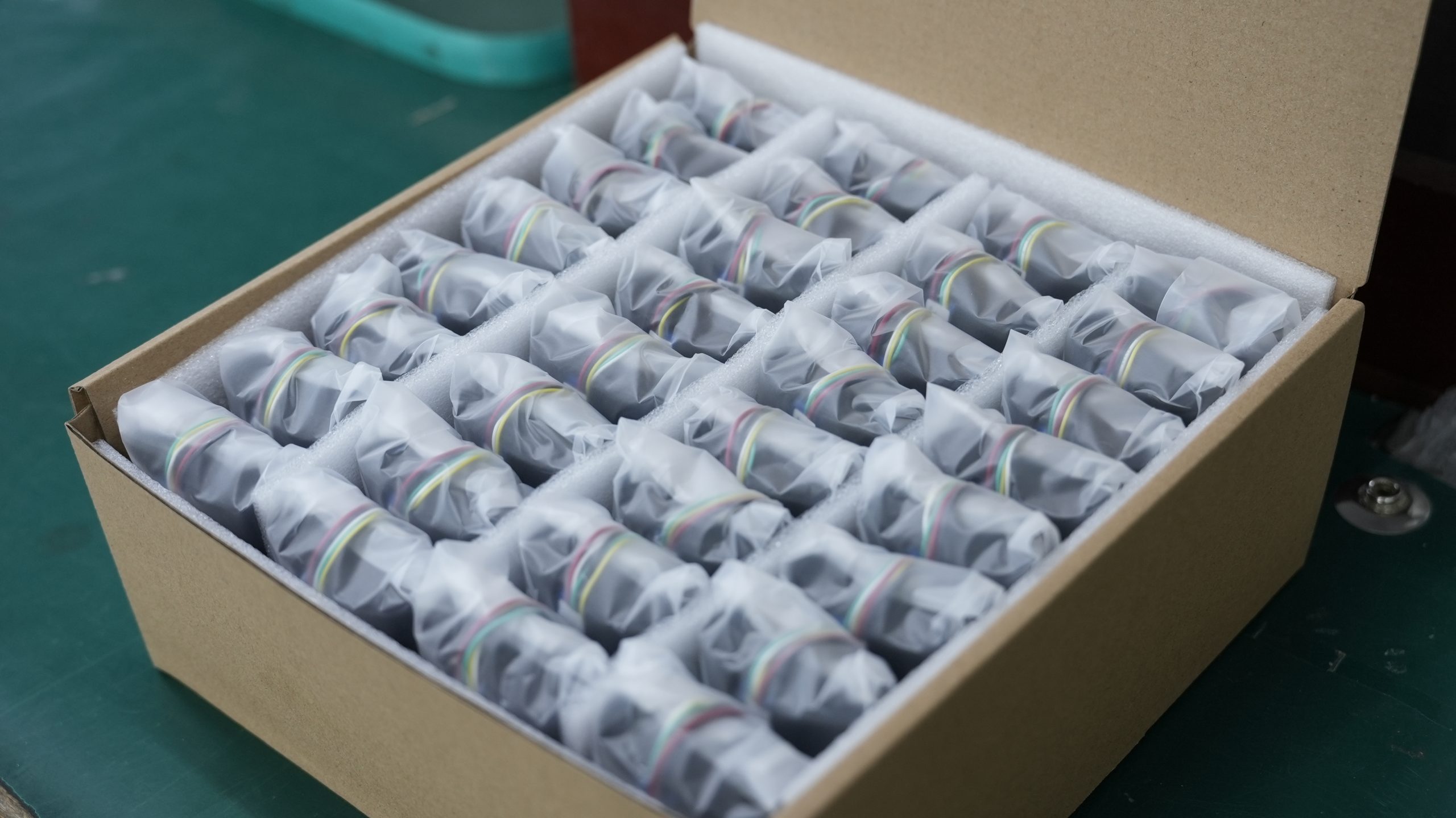
4.1 Measuring Power Use
You need accurate methods to measure power use in lithium battery-powered detection devices. Reliable measurement helps you understand how each component affects battery drain. The table below shows common methods you can use:
Method | Description |
|---|---|
Remote Sensing Power Supply | Applies precise voltage to the load, reducing errors from test lead voltage drops. |
Controlled Power Source | Tests devices under specific voltage conditions, unlike standard batteries. |
Fast Transient Response Supply | Supports wireless device testing by preventing issues during rapid power changes. |
Battery Simulation | Mimics real battery behavior from full charge to near discharge for realistic testing. |
You can also use built-in battery voltage sensors, like PowerBooter, to monitor total system power consumption without extra equipment. This approach works well in industrial and infrastructure monitoring, where you need continuous data.
4.2 Identifying Inefficiencies
You must identify where your device wastes energy to extend runtime. Common inefficiencies include:
Cellular and satellite transmissions, which drain batteries quickly, especially with poor signal.
Background software processes and wireless communications, which increase power use.
Displays and user interactions, which often account for the largest share of battery drain.
Environmental factors, such as extreme temperatures, which can worsen battery performance.
You should match the battery’s characteristics to the device load and use battery fuel gauges for intelligent energy management. Engineers often select ultra-low-power components, use efficient voltage regulators, and minimize active duty cycles to reduce waste. Disabling unused peripherals and optimizing RF transmissions also help lower battery drain.
4.3 Continuous Improvement
You can achieve continuous improvement by integrating real-time data into your battery management system. This process uses feedback loops to refine predictive models and adapts to changes in battery behavior or the environment. Event-based analysis plays a key role. It gives you insights into system behavior, reveals performance bottlenecks, and highlights unexpected issues. Visualization tools, such as heatmaps and runtime graphs, help you spot hidden dependencies and guide your optimization strategies. Non-intrusive probing techniques let you monitor application behavior without risking device performance. By applying these methods, you can extend runtime and maintain reliable operation in medical, robotics, security, and industrial detection devices.
You need to balance battery capacity and power consumption to extend runtime in portable detection devices. Combining battery selection, hardware design, and software optimization gives you the best results. Recent research highlights these key points:
Optimizing power consumption is crucial for longer battery life in IoT and industrial devices.
Duty cycling reduces energy use by limiting active periods.
Battery management systems help you use energy efficiently.
Use this checklist to keep your lithium battery-powered devices running reliably:
Checklist Item | Description | Frequency |
|---|---|---|
Visual and Structural Inspection | Inspect for physical damage, verify labels, check for water ingress, etc. | Monthly or before extreme use |
Functional Testing | Verify boot-up diagnostics, test interfaces, run manufacturer diagnostics. | Quarterly or after firmware updates |
Electrical Testing and Circuit Integrity | Measure voltage, conduct insulation tests, confirm grounding. | Annually or after incidents |
Battery and Power System Review | Check for battery issues, monitor runtime, inspect charging ports. | Biannually for testing |
Firmware and Software Updates | Use OEM tools for updates, check compliance, document changes. | As released or quarterly recommended |
Calibration and Sensor Validation | Calibrate according to recommendations, verify against standards. | Every 6–12 months |
Maintenance Documentation | Maintain logs of inspections, tests, and repairs. | Ongoing |
Continue to analyze device data and refine your strategies. This approach helps you extend runtime and maintain reliable operation in medical, robotics, security, infrastructure, and industrial applications.
FAQ
What factors most affect runtime in lithium battery-powered detection devices?
You will see the biggest impact from device load, battery capacity, and power management. Environmental conditions, such as temperature, also play a key role. You should always match your battery pack to your device’s needs for best results.
How do you calculate expected runtime for a detection device?
You can use this formula:Runtime (hours) = Battery Capacity (Wh) ÷ Device Power Consumption (W)
For example, a 20Wh battery and a 2W device give you 10 hours of runtime.
Which lithium battery chemistry is best for industrial detection devices?
You should choose lithium iron phosphate (LiFePO₄) for high safety and long cycle life. Lithium nickel manganese cobalt oxide (NMC) offers higher energy density. The table below compares both:
Chemistry | Safety | Cycle Life | Energy Density |
|---|---|---|---|
LiFePO₄ | High | 2000+ | Moderate |
NMC | Medium | 1000–2000 | High |
How can you extend runtime without increasing battery size?
You can optimize hardware, use adaptive power modes, and reduce duty cycles. Lowering screen brightness and disabling unused features also help. Regular firmware updates often add new power-saving options.
Why does temperature affect lithium battery performance?
You will notice that low temperatures slow chemical reactions, reducing capacity. High temperatures speed up aging and can damage cells. Always operate lithium battery packs within the recommended range for best performance.


